Welcome to the Rugged IT MC9400 and MC9450 comprehensive Buyer’s Guide. We understand that finding clear and concise information about the Zebra MC9400 can be challenging. So here is everything you need to know.
The Zebra MC9400 and MC9450: Evolution of the Ultra-Rugged Powerhouse
The Zebra MC9400 and MC9450 represent the next evolution in the ultra-rugged MC9000 Series mobile computers, and the specs are impressive. We’re talking 2.5x more processing power than their predecessor (the MC9300), 50% more RAM, four times the Flash storage, and eight times the micro SD storage capacity. These Android-based handheld devices are built to survive the most demanding industrial environments while delivering enhanced connectivity with Wi-Fi 6E, 5G capabilities (on the MC9450), and advanced scanning performance.
The Usual Zebra Paradox of Choice
As with most other Zebra products, the MC94XX series comes in way more variations than seems necessary given that the use cases for a gun style data capture device like this really don’t vary much. After throwing all of the ingredients into the mixing bowl Zebra has a mind blowing 53 different SKU’s on offer. As a result, you’ll usually only find the core range of the most popular versions is stock with distributors and importers with niche configurations available on lengthily backorder only.
Meet the MC9450: The Real Game-Changer
Joining the MC9400 in the new series is probably one of the most significant new additions to the series, the MC9450. The addition of the 50 in the MC9450 signals mobile connectivity, which in this case is 5G. This is the first time that the big Zebra brick format has been completely free of its Wi-Fi leash.
Key Features Overview
Performance Specifications
- Processor: Qualcomm 4490 octa-core, 2.4 GHz
- Memory: 6 GB RAM/128 GB Flash storage
- Operating System: Android (supports versions through Android 17)
- Expansion: MicroSD supports up to 2 TB
Physical Design
- Dimensions: 9.4 in. L x 3.5 in. W x 7.4 in. H (240 mm L x 88 mm W x 189 mm H)
- Weight: 26.2 oz./743 g with battery
- Display: 4.3 in. WVGA (800 x 480), color display, 600 NITS brightness
- Form Factor: Gun-style grip with keypad options
Durability Standards
- Drop Rating: 12 ft./3.65 m to concrete (standard), exceeds MIL-STD-810H
- Water/Dust Protection: IP65 and IP68 with battery
- Temperature Range: Standard: -4°F to 122°F (-20°C to +50°C)
- Display Protection: Corning Gorilla Glass for display and scanner window
Scanning Technology
The Zebra MC9400 and MC9450 mobile computers are available with two scan engine configurations to address different operational scanning requirements.
SE58 Extended Range Scanner
The MC9400 features the SE58 Extended Range Scan Engine with IntelliFocus technology, which Zebra claims can scan barcodes from in-hand to over 100 ft./30.5 m away. Now, before you start planning to scan shelf labels from across the warehouse, let’s be realistic about these numbers. Don’t expect to be scanning your average-sized racking labels from this distance—these impressive figures come with quite a few caveats.
Like most manufacturers’ specifications, a large number of variables come into play that affect real-world performance. Barcode size makes a massive difference (try scanning a tiny 2cm label from 30 metres and you’ll see what I mean), as does print quality, barcode type, and environmental factors such as lighting conditions. A perfect, large barcode in ideal lighting? Sure, the SE58 might reach those distances. Your typical warehouse label on a busy Tuesday afternoon? That’s a different story entirely.
Having said that, I have to give credit where it’s due—the SE58 is definitely one of the best performing scan engines on the market. You’ll be hard pressed to find a ‘normal’ use scenario where it doesn’t excel. Whether you’re dealing with damaged labels, tricky angles, or less-than-perfect lighting, this engine consistently delivers reliable reads when others might struggle. It’s just important to set realistic expectations rather than believing the marketing numbers at face value.
SE4770 Standard Range Scanner
Now, if you’re looking at the MC9400’s other scan engine option, the SE4770 takes a more pragmatic approach to scanning performance. This is what I’d call the “sensible choice” for most warehouse and manufacturing operations—it doesn’t promise to scan the moon, but it gets the job done consistently and reliably.
The SE4770 is essentially Zebra’s miniature powerhouse that’s been designed with real-world applications in mind. It features a red laser aimer that’s particularly useful for scanning at moderate ranges and in bright sunlight conditions, where LED aimers might struggle to remain visible. Unlike its flashier SE58 sibling, the SE4770 doesn’t make grandiose claims about extreme range capabilities, but what it lacks in marketing pizzazz, it makes up for in dependable performance.
What I appreciate about this engine is its use of PRZM Intelligent Imaging technology and advanced features like global shutter, superior lens optics, and maximum motion tolerance—all the technical bits that actually matter when you’re trying to scan a slightly damaged barcode on a busy warehouse floor. The reality is that most scanning scenarios in industrial environments involve standard working distances, and the SE4770 handles these exceptionally well.
MC9400 / MC9450 Keyboard Options
Keyboard Flexibility: If It Ain’t Broke, Don’t Fix It
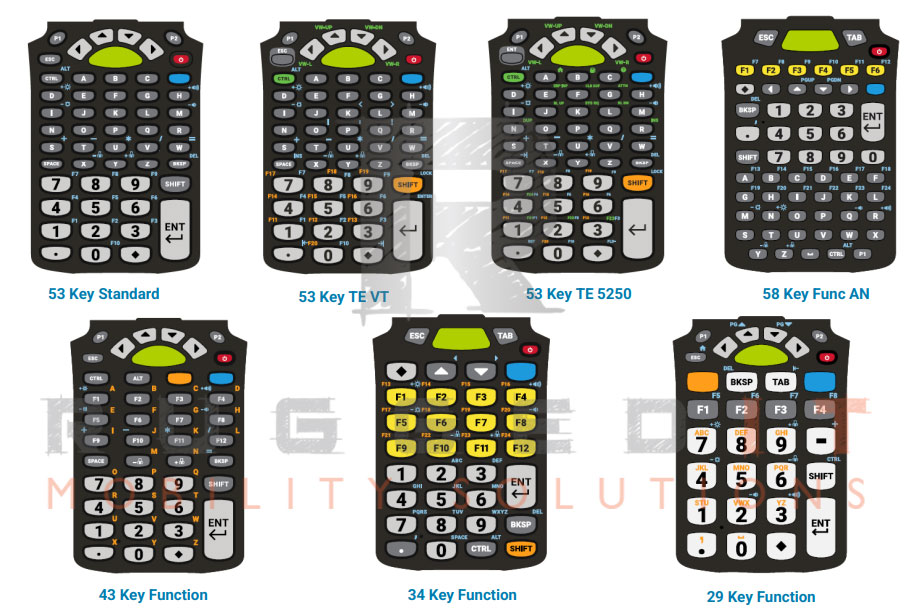
The MC9400 and MC9450 continue Zebra’s long-standing tradition of offering multiple keyboard configurations, and frankly, it’s one of those features that just keeps working well. The MC9 range has offered field-swappable keypads for years now, and the latest models maintain this practical approach with seven different configurations.
Before you think “nothing new here,” remember that some features don’t need reinventing – they just need to keep doing what they do well. The field-swappable approach means no service depot visits, no downtime, just swap and go.
Available Configurations
The range spans from comprehensive to streamlined:
- 58-Key AlphaNumeric
- 53-Key AlphaNumeric Standard
- 53-Key Terminal Emulation (5250 and VT)
- 43-Key Layout
- 34-Key Numeric/Function
- 29-Key Numeric/Calculation
What continues to impress about this approach is how practical it remains in real-world scenarios. The colour-coded alternate function keys make transitions between layouts manageable, and the backlit keys maintain the same reliable visibility we’ve come to expect from the MC9X series.
Proven Functionality That Works
Whilst the keyboard options themselves aren’t revolutionary, their continued presence in the MC9400/MC9450 lineup shows Zebra understands that some features are simply essential. It’s the kind of proven functionality that doesn’t need flashy marketing because it solves genuine operational challenges.
I’ve seen warehouses seamlessly transition from numeric keypads for basic inventory counts to alphanumeric layouts when expanding into complex SKU management – all without device replacement costs. The 53-key variants hit that sweet spot for most applications, whilst the terminal emulation options (supporting 5250 and VT protocols) will make your legacy system administrators very happy indeed.
The fact that Zebra has maintained backward compatibility with MC9300 accessories, including keyboards, deserves particular mention. Existing users can upgrade their devices without throwing away their keypad investments – a practical consideration that’s often overlooked but genuinely appreciated by procurement teams watching their budgets.
Variants: Freezers to Flammables
The MC9400 and MC9450 come in three distinct environmental configurations, each engineered for specific operational realities:
- Standard Model – For typical warehouse and distribution environments (-20°C to 50°C)
- Freezer Model – Purpose-built for cold storage operations (down to -30°C)
- Non-Incendive Model – Certified safe for hazardous locations with flammable materials
The standard model handles the typical warehouse environment admirably, operating from -20°C to 50°C with its 7000mAh battery providing solid all-shift performance. Most operations will find this variant more than capable. The freezer model, however, is where things get properly specialised – built to withstand constant -30°C environments, it features a specially designed battery, heated display to prevent frost build-up, and condensation-resistant sealing. Having seen these units transition seamlessly from freezer to dock door in mid-summer without missing a beat, the engineering genuinely impresses. The touch screen remains responsive even with heavy gloves, and the internal heaters prevent that frustrating fog-up when moving between temperature zones.
The non-incendive variant targets an entirely different challenge – hazardous environments where a single spark could prove catastrophic. Certified for Class 1, Division 2 hazardous locations (Groups A, B, C, D), it’s built for chemical plants, refineries, pharmaceutical manufacturing, and paint facilities where volatile compounds are part of daily operations. The certification process means this model costs considerably more and weighs slightly extra due to the protective housing modifications, but when you’re handling flammable materials, there’s no room for compromise. What’s particularly clever is that Zebra hasn’t sacrificed functionality for safety – you still get the same processing power, scanning capabilities, and keyboard options, just wrapped in intrinsically safe packaging. Each variant maintains the same drop specs and IP ratings, proving that specialisation doesn’t mean accepting trade-offs in durability.
Software
Ivanti Velocity pre-licensing eliminates immediate costs
The MC9400 and MC9450 include pre-loaded and pre-licensed Ivanti All Touch TE software, providing immediate terminal emulation capabilities without additional licensing costs. This pre-licensing covers core terminal emulation functions including telnet applications, basic screen modernization, and barcode integration through DataWedge. Specific details regarding Ivanti Velocity pre-licensing see the Ivanti website here.
What’s included out-of-the-box: Complete terminal emulation support, touch screen optimisation for legacy applications, multi-session capabilities, and image insertion for visual confirmation workflows. The software interfaces with existing WMS, ERP, and supply chain management systems without requiring host system modifications
Backwards Compatibility
A Masterclass in Upgrade Economics
One of the smartest moves Zebra made with the MC9400 and MC9450 was maintaining extensive backwards compatibility with MC9300 accessories – a decision that transforms what could be a painful migration into a manageable rollout. Your existing charging infrastructure, including single-slot cradles, four-slot battery chargers, and vehicle mounts, all work seamlessly with the new models. This isn’t just about saving money (though finance departments will certainly appreciate avoiding a complete accessory refresh); it’s about enabling phased deployments. I’ve watched operations gradually transition their fleet, mixing MC9300s and MC9400s on the same charging racks without any compatibility headaches. The keyboards, holsters, and even the hand straps carry over, meaning your workers don’t need retraining on basic device handling.
Where this compatibility really shines is in battery management. The MC9400/MC9450 accepts the same 7000mAh PowerPrecision+ batteries as its predecessor, meaning your spare battery inventory remains relevant. For warehouses that have built up battery pools to ensure continuous operations, this represents thousands of dollars in preserved investment. The software side maintains similar compatibility strengths – applications written for the MC9300 typically run without modification, and the familiar Android interface means minimal retraining.
The Bottom Line
Making Sense of the Zebra MC9400/MC9450
After dissecting the MC9400 and MC9450 from every angle, the verdict is refreshingly straightforward – these are exceptionally capable devices that know exactly what they’re meant to do. The evolution from the MC9300 isn’t revolutionary, but that’s actually a compliment. Zebra has refined what worked, boosted the specs where it mattered, and resisted the temptation to fix what wasn’t broken.
The standout addition is undoubtedly the MC9450’s 5G capability. For operations that have been waiting years for true cellular freedom in this form factor, it’s a genuine game-changer. No more dead zones between warehouse WiFi coverage, no more connectivity headaches at remote loading docks, and critically, no more being tethered to your facility’s network infrastructure. However, if your operations are contained within solid WiFi coverage, the standard MC9400 remains the sensible choice – why pay for 5G you won’t use?
Availability
Rugged IT available models
The following models are commonly available through Rugged IT
Zebra MC9400 – MC9401-0G1M6DSS-A6
Zebra MC9400 – MC9401-0G1R6DSS-A6
Zebra MC9400 – MC9401-0G1R6HSS-A6
Zebra MC9400 – MC9401-0G1J6DSS-A6
Zebra MC9450 – MC945B-3G1M6DSS-A6
Zebra MC9400 – MC9401-0G1M6HSS-A6
Zebra MC9400 – MC9401-0G1M6DCS-A6
Zebra MC9400 – MC9401-0G1M6HSS-A6
Zebra MC9400 – MC9401-0G1M6HCS-A6
Zebra MC9400 – MC9401-0G1P6DSS-A6